
In This Article
Overview
When an order is placed, Quivers automatically screens it for fraud through Signifyd. If the screening detects potential fraud, the order's status changes to Fraud Detected, and it appears under the Review tab in the Order Details Panel — awaiting a decision before it can move on to claiming and fulfillment.
From the Review tab, the business has the opportunity to override the fraud decision, take on the fraud liability, and process the order — or to accept the decline and cancel it.
Reviewing a Flagged Order
Open the flagged order and go to the Review tab. Select the checkbox next to the order (or the specific items) you want to act on, then choose one of the following:
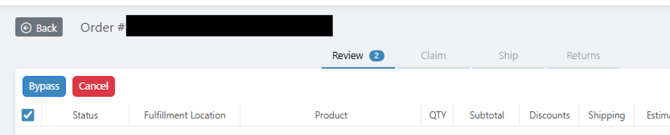
Bypass
Click Bypass to override the fraud decline and continue processing the order, accepting liability for it.
Important: If Bypass is selected and a chargeback is later received for the order, the business will be subject to funds being collected to cover that chargeback. If Quivers receives a chargeback for an order whose status was overridden, the business will not receive the funds for that order.
Cancel
Click Cancel to accept the fraud decline. This cancels the order — or just the selected items — and the customer is notified automatically. Confirm the cancellation reason in the pop-up window that appears.
Best Practice: Use Cancel when you're not willing to accept the fraud risk on a flagged order or item.
Leaving an Order Under Review
If neither action is taken, the order remains under Review until the override timer expires, at which point it is automatically canceled.
Frequently Asked Questions
What does it mean when an order is flagged for fraud review?
Quivers runs new orders through automated fraud screening via Signifyd. If the screening detects potential fraud, the order's status changes to Fraud Detected and it's held under the Review tab until you Bypass or Cancel it.
What happens if I click Bypass and a chargeback comes in later?
Bypassing the decline means your business accepts the fraud liability for that order. If a chargeback is later filed against it, funds will be collected from your business to cover it, and if Quivers itself receives the chargeback, your business will not receive the funds for that order.
What happens if I click Cancel?
The order (or the specific items you selected) is canceled and the customer is notified automatically. You'll be asked to confirm the cancellation before it's finalized.
What happens if I don't take any action on a flagged order?
It stays under Review until the override timer runs out, and is then canceled automatically — the same outcome as clicking Cancel, just on a delay.
Can I cancel only some of the items on a flagged order, instead of the whole order?
Yes. Select the checkbox next to just the item(s) you want to act on before clicking Bypass or Cancel — the rest of the order is unaffected.
Where do I find the Bypass and Cancel buttons?
In the Order Details Panel, on the Review tab, once you've selected the checkbox next to the order or items you want to act on.