
In This Article
- What Is a Product Discount?
- Before You Start
- Setting Up a Product Discount
- Frequently Asked Questions
What Is a Product Discount?
A Product Discount applies when the cart contains items matching the specific products you've assigned to the discount — useful for promoting a single item or a hand-picked list, rather than an entire category.
Before You Start
Product is one of five Discount Types available in Quivers. Before configuring the steps below, complete the shared setup steps — naming the discount, Codes, Duration, Bypass Connections, and selecting your Storefront — described in How to Create a Discount.
Helpful Tip: For more detail on any of these basics — Codes, Duration, Bypass Connections, Discount Requires Code, or Limits — see How to Create a Discount.
Note: Want this discount to share a usage limit with other discounts, or combine it with Prevent Using with Other Discounts? See the Limits section of How to Create a Discount — those two settings can conflict with each other, so it's worth reading before you configure either one.
Setting Up a Product Discount
After selecting Product as the Discount Type and choosing your Storefront, choose one of the following configurations.
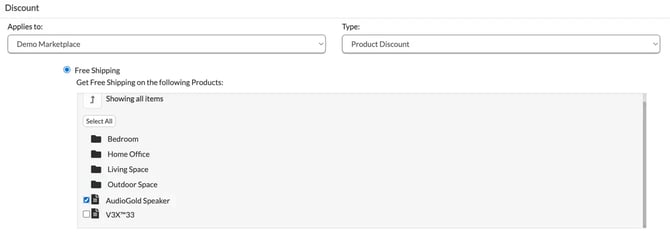
Offer Free Shipping on Product(s)
- Select the product(s) that should qualify for free shipping.
Take a Dollar Amount or Percentage Off Products
- Enter the Take Off amount after choose "Product Discount".
- Choose whether it's a % or $ discount.
- Choose the Product(s) the discount applies to.
Set a "Buy X, Get Y Free" Offer
- Choose your Buy Quantity.
- Choose the Product(s) the discount applies to.
- Choose your Get Quantity.
- Choose whether the free item(s) must be of the same product, or can be any of the selected products.
- Use the toggle to select "of the same item" or "of any of the selected products."
Note: Is Multiplicative — If checked, a customer can receive multiple instances of this discount in one order (e.g., a Buy 1 Get 1 offer where a customer buying 5 qualifying items gets 5 free). If left unchecked, only one item is free regardless of quantity purchased.
Frequently Asked Questions
Q: What's the difference between a Product Discount and a Category Discount?
A: A Product Discount is scoped to specific products you select individually. A Category Discount instead applies to an entire category, automatically covering every product in it — including ones added later. See How to Create a Category Discount.
Q: Can I run a Buy X Get Y offer as a Product Discount?
A: Yes — select your Buy Quantity, the product(s) that qualify, your Get Quantity, and whether the free item(s) must match the same product or can be any of the selected products.