
In This Article
What Is an Order Discount?
An Order Discount applies when the order as a whole contains between a minimum and maximum number of products, or falls between a minimum and maximum total price — rather than being tied to specific products, categories, or customers.
Before You Start
Order is one of five Discount Types available in Quivers. Before configuring the steps below, complete the shared setup steps — naming the discount, Codes, Duration, Bypass Connections, and selecting your Storefront — described in How to Create a Discount.
Helpful Tip: For more detail on any of these basics — Codes, Duration, Bypass Connections, Discount Requires Code, or Limits — see How to Create a Discount.
Note: Want this discount to share a usage limit with other discounts, or combine it with Prevent Using with Other Discounts? See the Limits section of How to Create a Discount — those two settings can conflict with each other, so it's worth reading before you configure either one.
Setting Up an Order Discount
After selecting Order as the Discount Type and choosing your Storefront:
- Enter the % or $ amount you want to take off the order.
- Enter the price range (When Order Amount is greater than or equal to / less than or equal to) within which the discount applies.
- Enter the quantity range (When Order Quantity is greater than or equal to / less than or equal to) within which the discount applies.
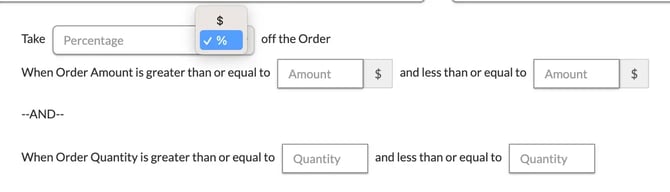
Note: The price range and quantity range are combined with AND, not OR — the Quivers Panel shows this explicitly with an "--AND--" divider between the two. If you fill in both ranges, the order must satisfy the price range and the quantity range at the same time for the discount to apply, not just one or the other.
Frequently Asked Questions
Q: Does an Order Discount look at the whole cart or just certain items?
A: The whole order — it evaluates the order's total price and/or total item quantity, not individual products or categories.
Q: Can I combine an Order Discount with a Category or Product Discount?
A: Yes, as long as you haven't disabled it in Limits. Use "Prevent using with other Discounts" (described in How to Create a Discount) if you want discounts to be mutually exclusive.